
Dear parents and guardians,
It is always our goal to find ways to improve our services to you. One area in which we feel we can do better is information dissemination. In this regard, we would like you to install this new and free mobile application called SchoolZine, SZApp.
Here’s how to install SZapp:
- Search for the SchoolZine app (SZapp) on your mobile phone through Google Play Store or Apple App Store and click “Install”.

- Choose Europe as the region.
- Search for and select Duyan Learning Center.
- Register with your email address and name, and then create a password.
- Once registered you will be sent an email to confirm your email address.
- Open your email and click/tap the URL to confirm.
- Lastly, under Manage, make sure that Push Notifications, Default Subscription, and Parents/Guardians tabs are turned on. In the future there will be additional tabs.

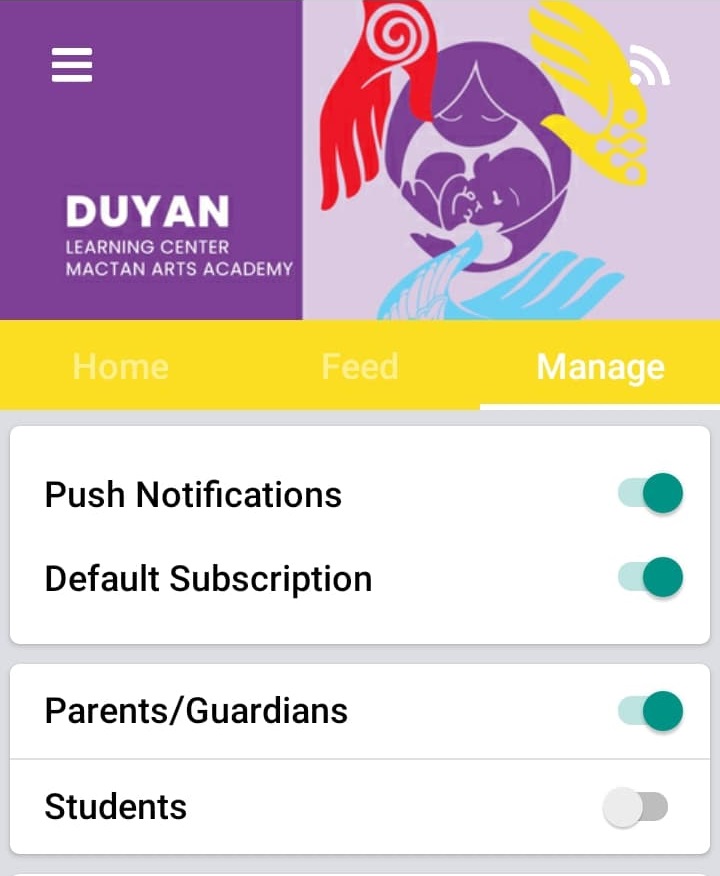
Once you are registered, you will be able to receive announcements and other notifications on your phone.
Thank you very much! Have a great school year! Take care and God bless you!
DUYAN Admin
 DUYAN Learning Center-Mactan Arts Academy